


One Platform. All Vendors. Reduced Costs.
SmartPO is a procurement and inventory management system that works for organizations of all sizes: from a single office to a complex corporation with multiple locations and departments. It's a complete procure-to-pay solution that handles internal requisitions, external purchase orders, receiving shipments, warehouse management, updating inventory, and routing invoices—all with reduced costs and improved efficiencies.
SmartPO serves as the foundation of MedProcure's Integrated Procurement Ecosystem, connecting purchasing activity, supplier relationships, contract compliance, spend visibility, and operational workflows across the organization.

Overview video
Watch our SmartPO Overview Video
This five-minute video gives you a complete overview of SmartPO's features and functions, as well as how it can work for your organization.
SmartPO
Procure-to-Pay Automation
Easy Ordering
ALL Vendors
SmartPO provides one platform for ordering from all your vendors. You can order from established suppliers using item masters or order one-time, specialty items and services.
Punchouts
With proper system permissions, you can search the web for products. Based on your preferences, punch-outs allow you to shop vendor sites (like Amazon or Office Depot) and have those items added to your SmartPO orders.
Barcode Scanning
Build orders right from the supply room by quickly scanning bar codes.
G/L Coding
Individual lines on each order can be coded to capture internal G/L codes, departments, grants, etc.
One Screen, Multiple POs
Behind the scenes, SmartPO builds a separate purchase order for each vendor and organizes them with tabs on the order screen.
Integrated EDI Engine
When you're ready, SmartPO sends each vendor's purchase order in their preferred format, be it EDI, FTP, SFTP, AS2, email, or customized integration to back-office systems.
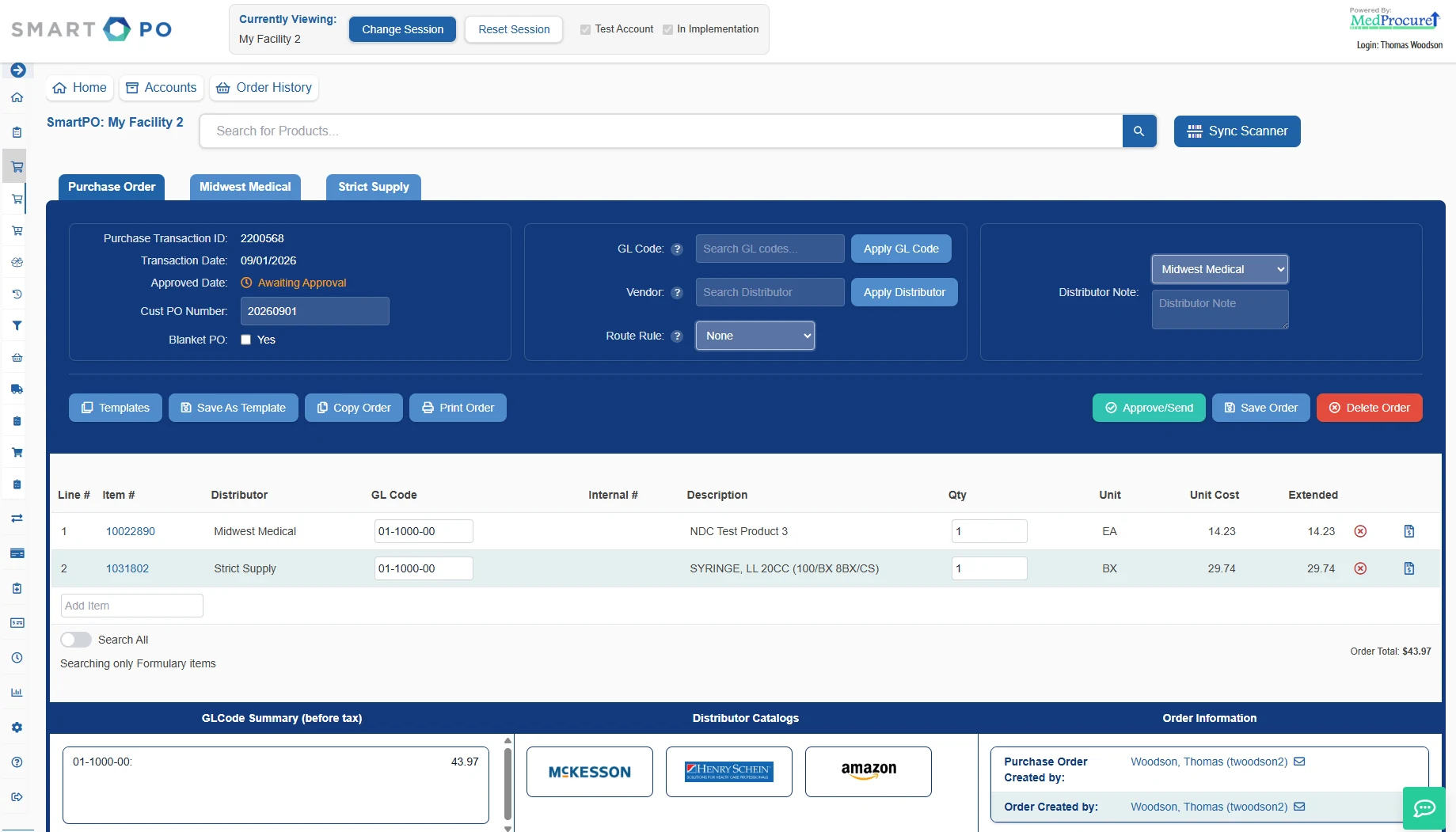
Tabs organize purchase orders that are automatically created for each vendor.
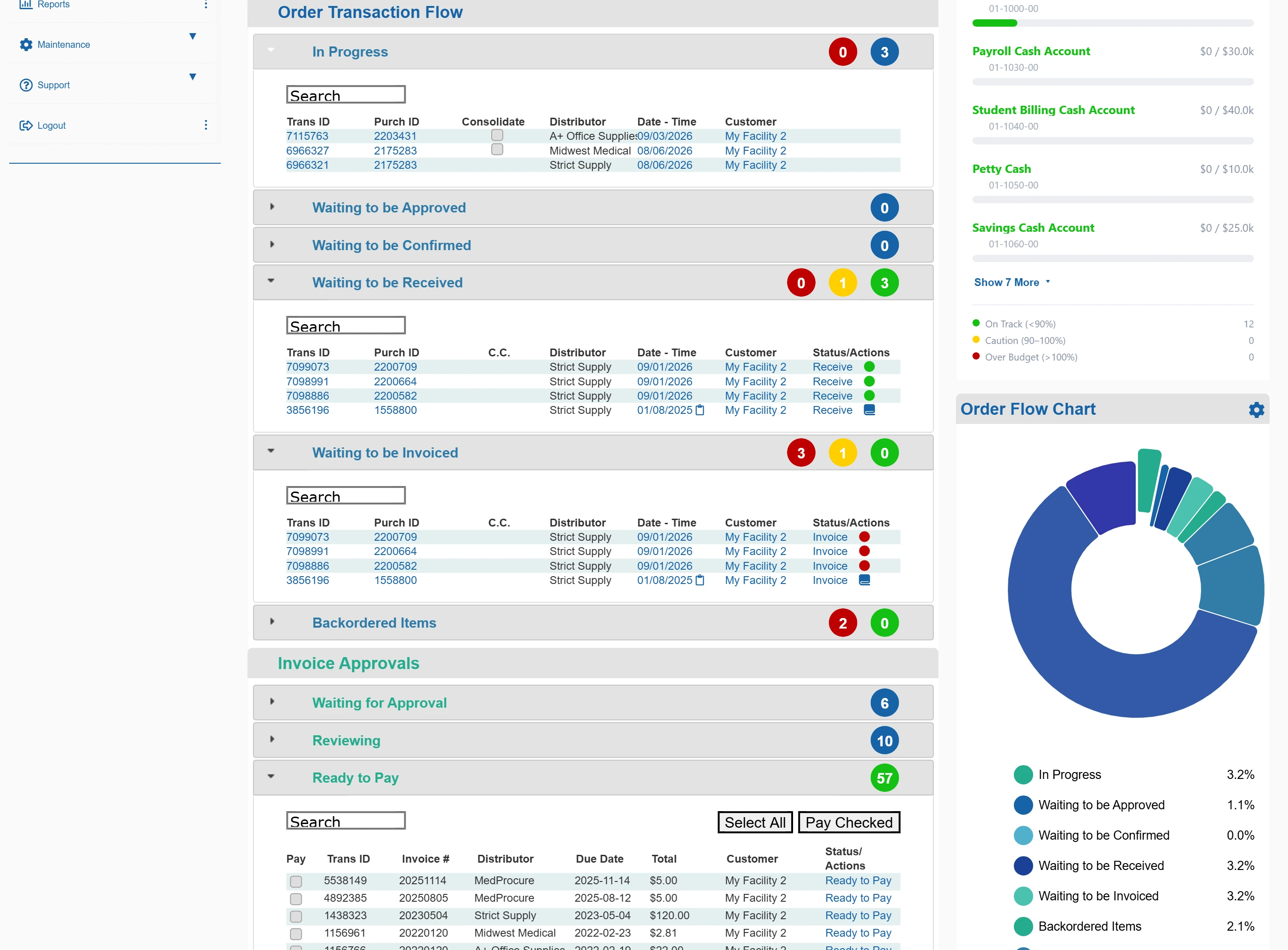
Order Transaction Flow
Every order sits in one pipeline—in progress, waiting to be approved, confirmed, received, invoiced or backordered—with invoice approvals and everything ready to pay underneath it.
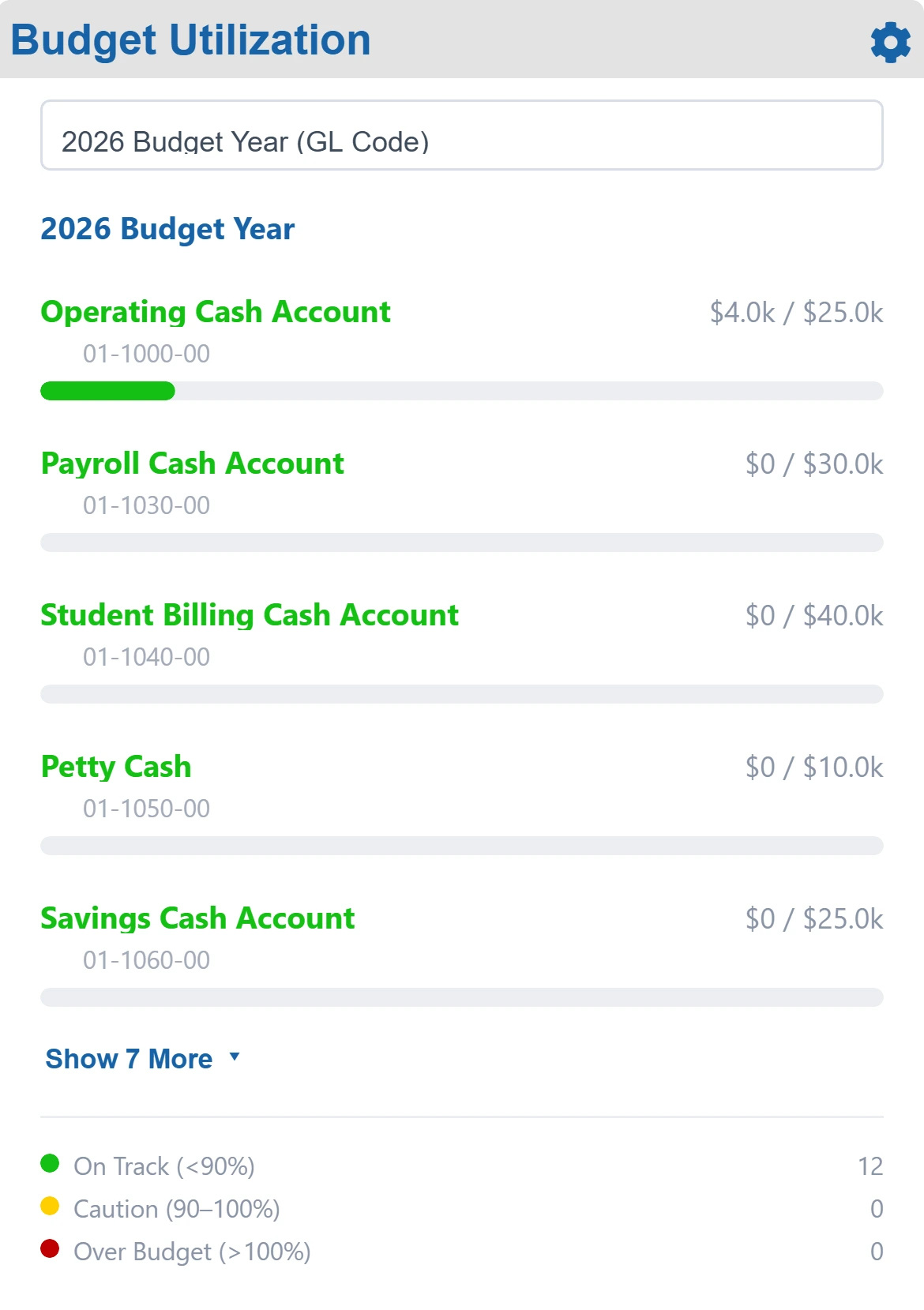
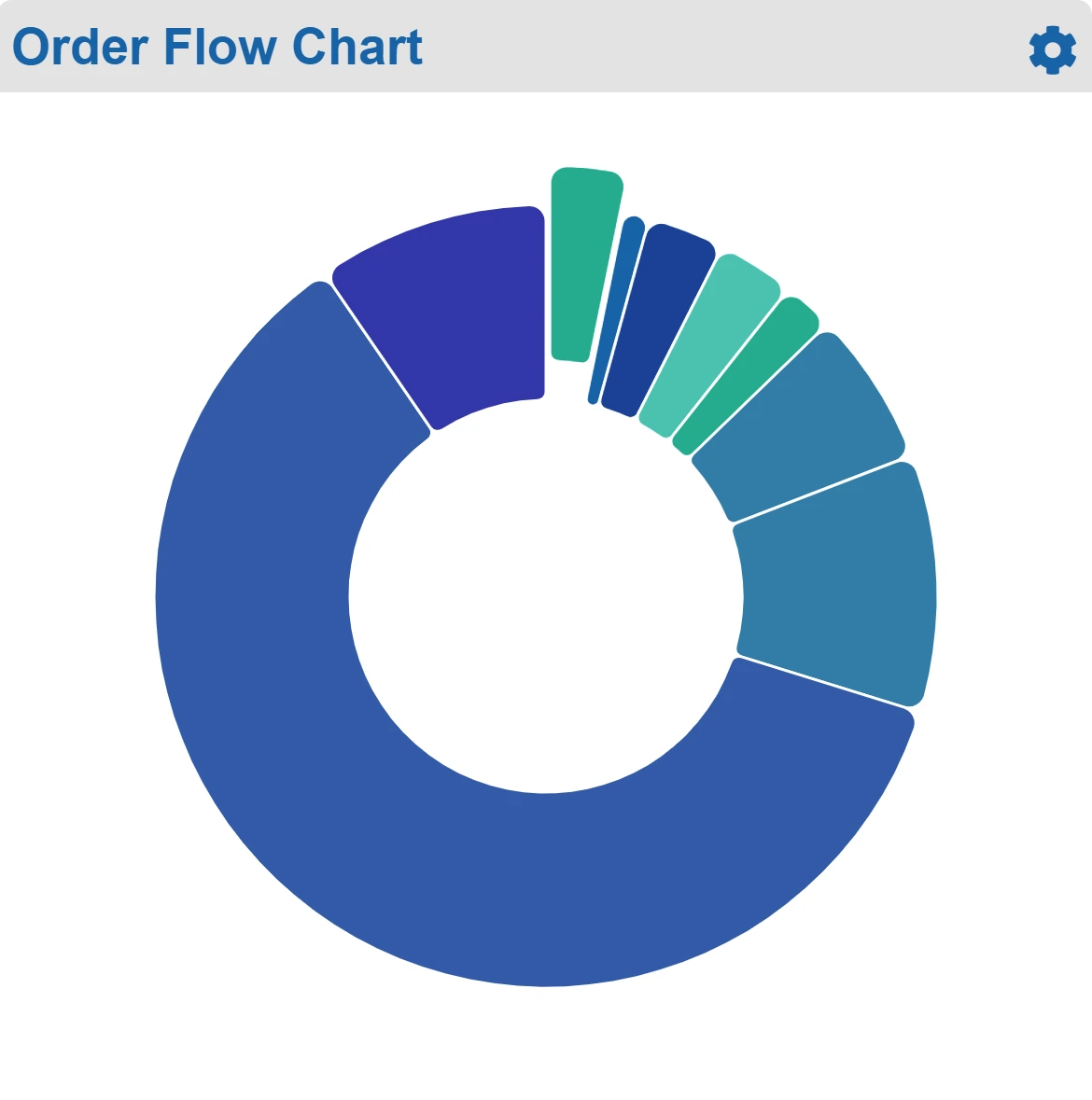
Budget and Order Visibility
The dashboard tracks spend against each budget line by G/L code, flagging accounts on track, in caution or over budget, and charts where every open order currently sits.
Correct Pricing
SmartPO stores established pricing and automatically audits prices under GPO contracts, direct contracts, and pricing agreements. As users enter items, the Opportunities window alerts users to potential cost savings. Pay exactly what you should—for every item, from every vendor, on every order. Read our white paper on managing supply costs.
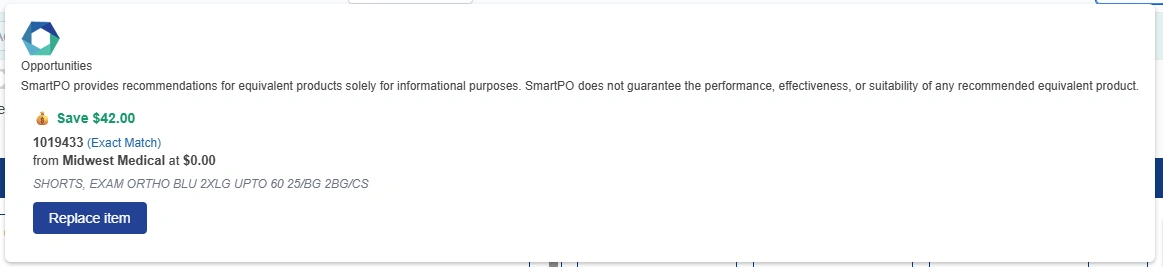
The Opportunities window alerts users to potential cost savings.
Simple Requisitions and Transfers
Staff throughout your organization can requisition products to be ordered, transferred between locations, or fulfilled from a warehouse or central supply group. For requisitions that are to be fulfilled internally, users can specify both the from and to location. Requisition approval rules are fully customizable. When fulfilling a requisition, warehouse or central supply personnel can view onhand inventory levels throughout the organization. When onhand quantities are insufficient, staff can initiate orders right from the Fulfillment screen.
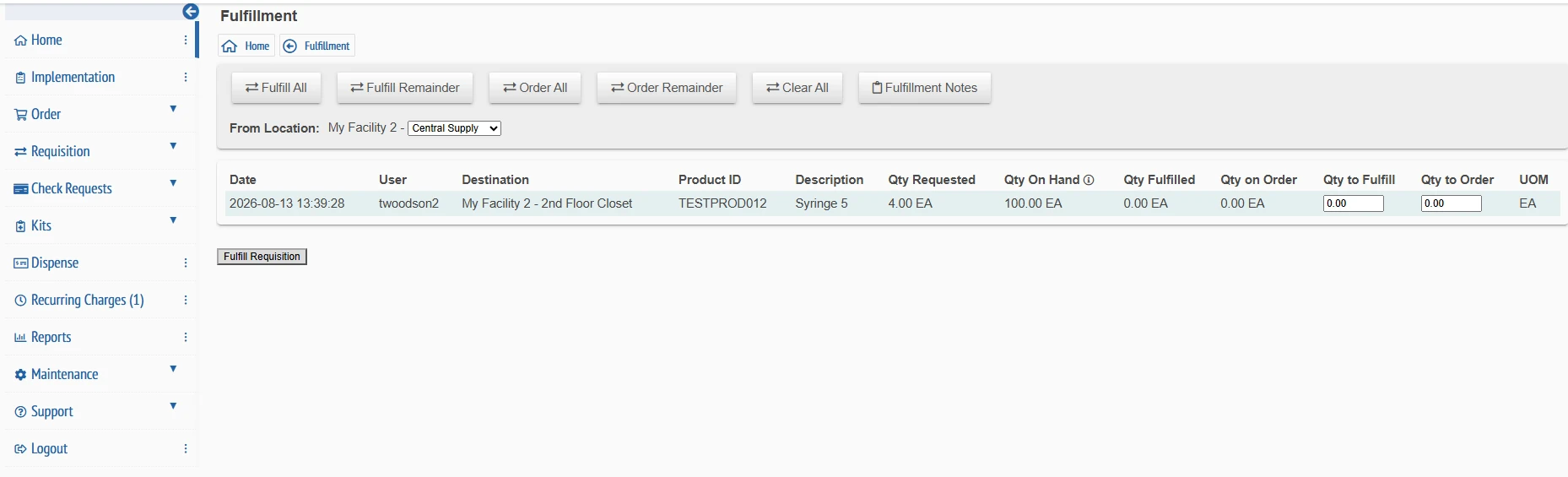
The Requisition Fulfillment screen displays quantities on hand and can be used to initiate orders when needed.
On-the-Fly Special Orders
Quickly order or requisition items that are not found in your product formulary or database by manually entering information for special order items.

The option to enter a special order item displays as you create an order or requisition.
Uncomplicated Approvals
Order reviews let you approve, deny, or place orders on hold in real time. If preferred, order approvals can be completely automated based on customizable rules. SmartPO works for multi-location groups desiring centralized review and control. Locally created orders can be held for final approval and release. Authorized users can review, edit, and release orders for all locations in their group.
Verified Receipts
Orders are marked as received with a single click. Electronically received invoices are matched against receivers, with prices automatically audited for each item. Exceptions can be routed back to suppliers for correction or clarification. Vendor documentation, such as packing slips, can be attached to each transaction set and routed with the invoice for approval. The result is accurate, paperless receipts and invoice approvals.
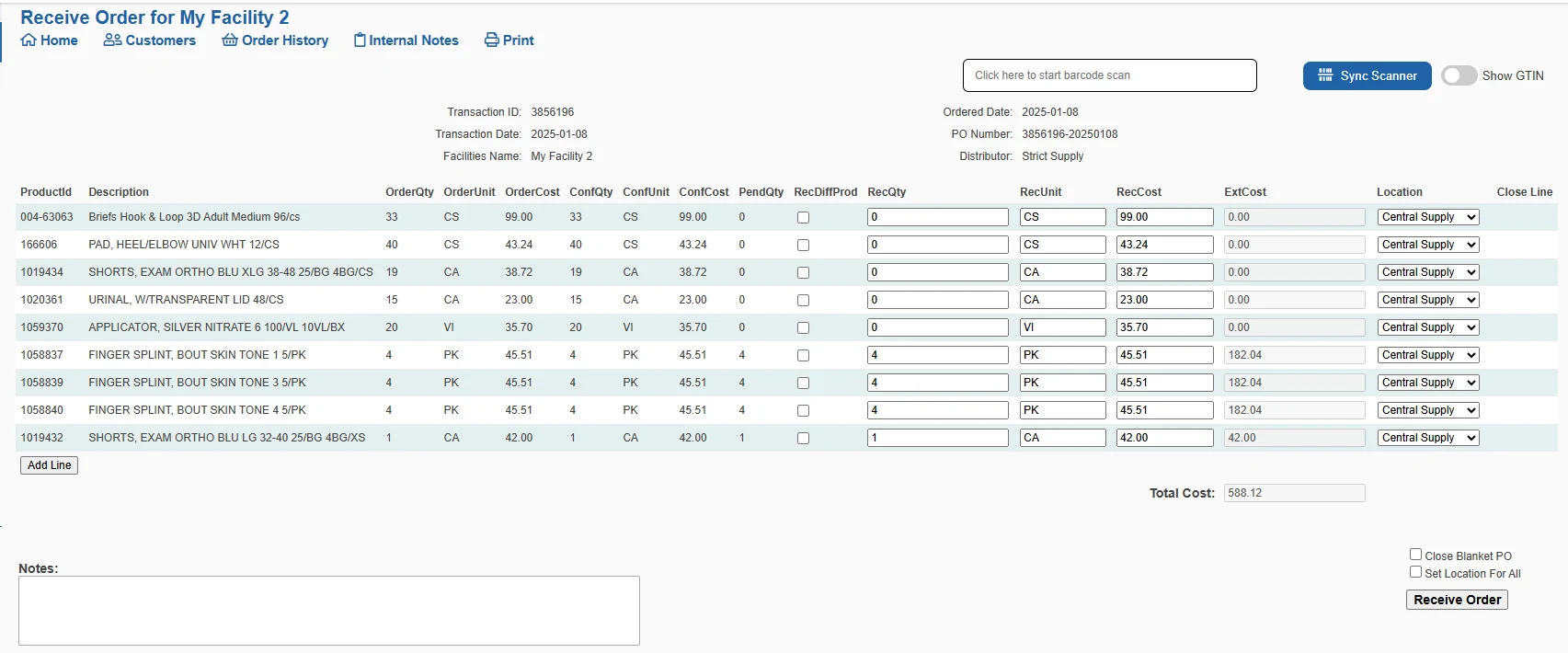
A single click marks orders as received.
Convenient Check Requests
Staff can enter check requests for reimbursements or non-PO vendor payments, with flexible rules enforcing your spending policies. Receipts or other documentation can be attached and forwarded with requests to your AP system for payment.
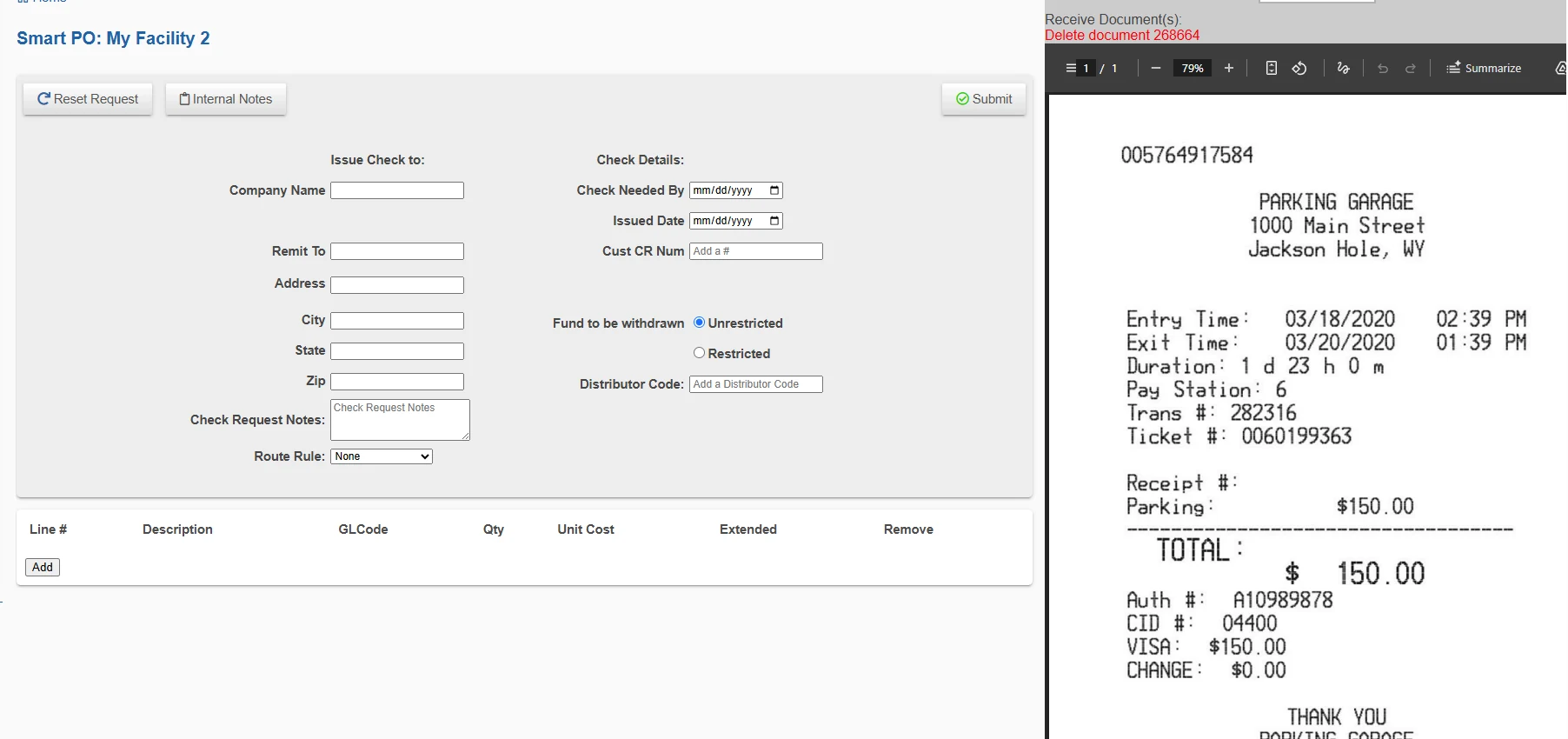
Easily attach documents, like the parking receipt shown here, to check requests.
Accounts Payable Interface
SmartPO interfaces with popular accounting systems. When an invoice is approved and ready for payment, SmartPO can upload the invoice and payment packet to your AP system, eliminating repetitive data entry.
SmartPO
Advanced Inventory Management
Watch our Inventory Management video →
Expiration Date Tracking
SmartPO can track injectables and other items with lot numbers and expiration dates. Email notifications alert staff as expiration dates approach, allowing them to ensure these products are rotated for first use. The by-product is reduced waste and loss of limited-lifespan products.
Item Cross Referencing
SmartPO allows you to define both functional equivalents and exact matches for any item in your product guide or formulary. This Item Cross Referencing lets you evaluate options from different vendors and easily find substitutes when a product isn't available, minimizing supply chain disruptions.
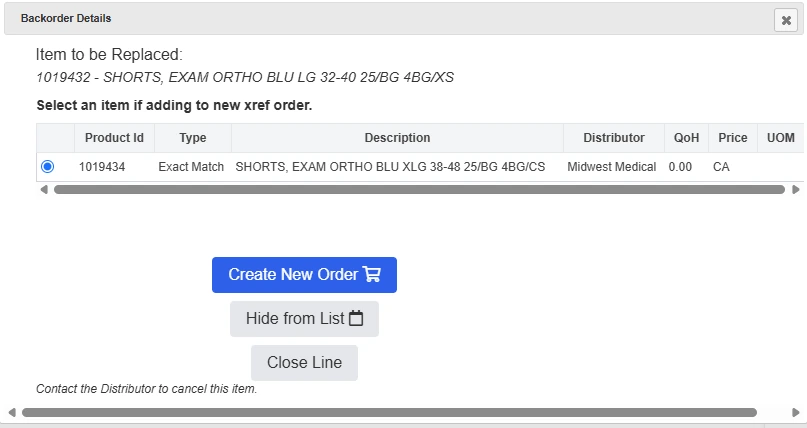
Item Cross Referencing makes it easy to find substitutes when an item is backordered or unavailable.
Item Counts
SmartPO can optionally track exact inventory counts for some or all products, even across multiple locations. Know what's on hand and when you need to reorder.
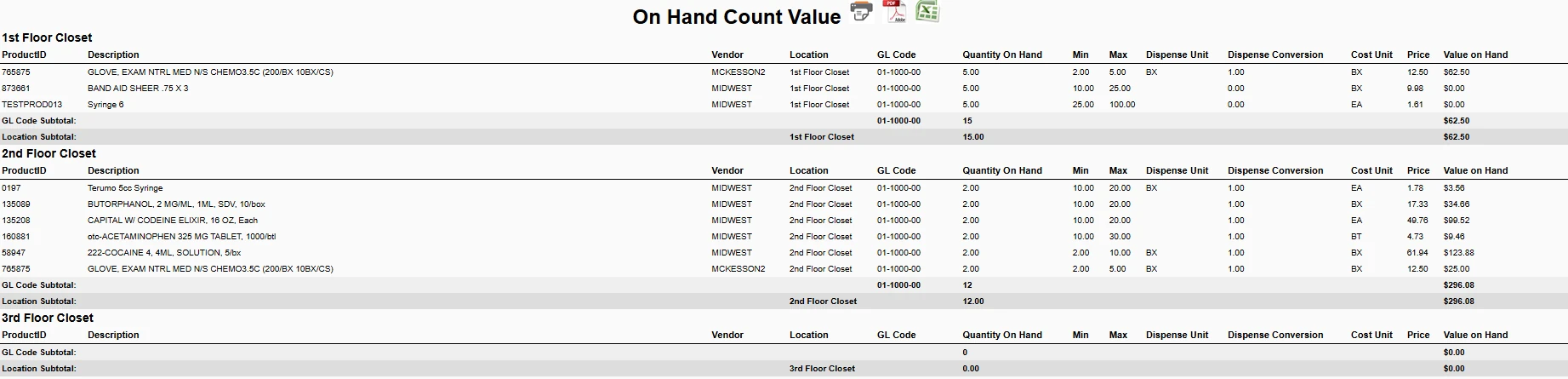
SmartPO can optionally track on-hand counts and display them through a variety of reports.
Automated Replenishment
SmartPO allows you to create minimum quantities, or par levels, for some or all items. The system alerts you when par levels are low, and it provides options for automatically generating purchase orders to bring quantities back to your pre-defined levels. These purchase orders follow your customized approval processes.
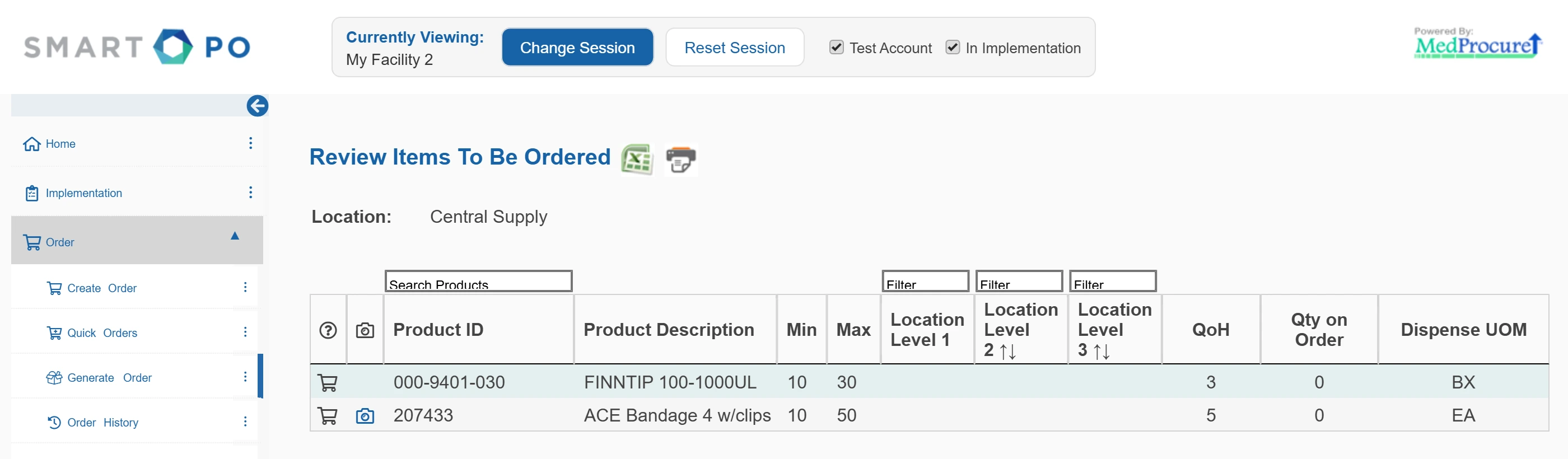
Items below their par level, with on-hand quantities and anything already on order.
General Ledger Coding
Your customized product guide can include a general ledger code for each item. The GL code is included as you create orders and throughout the procure-to-pay cycle, so you don't need to re-enter this information during the ordering, invoicing, and payment processes.
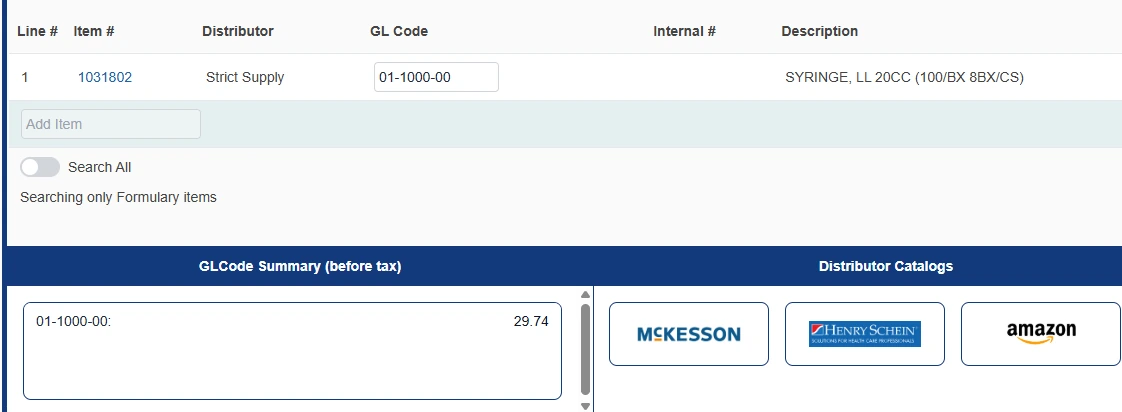
General Ledger codes are automatically pulled from your product guide when creating orders.
SmartPO
Resident Usage and Charges
Streamlined Dispenses
In long term or elderly care environments, SmartPO simplifies the job of tracking supplies and services used by individual residents. Integrated scan functionality can make dispensing practically keyless.
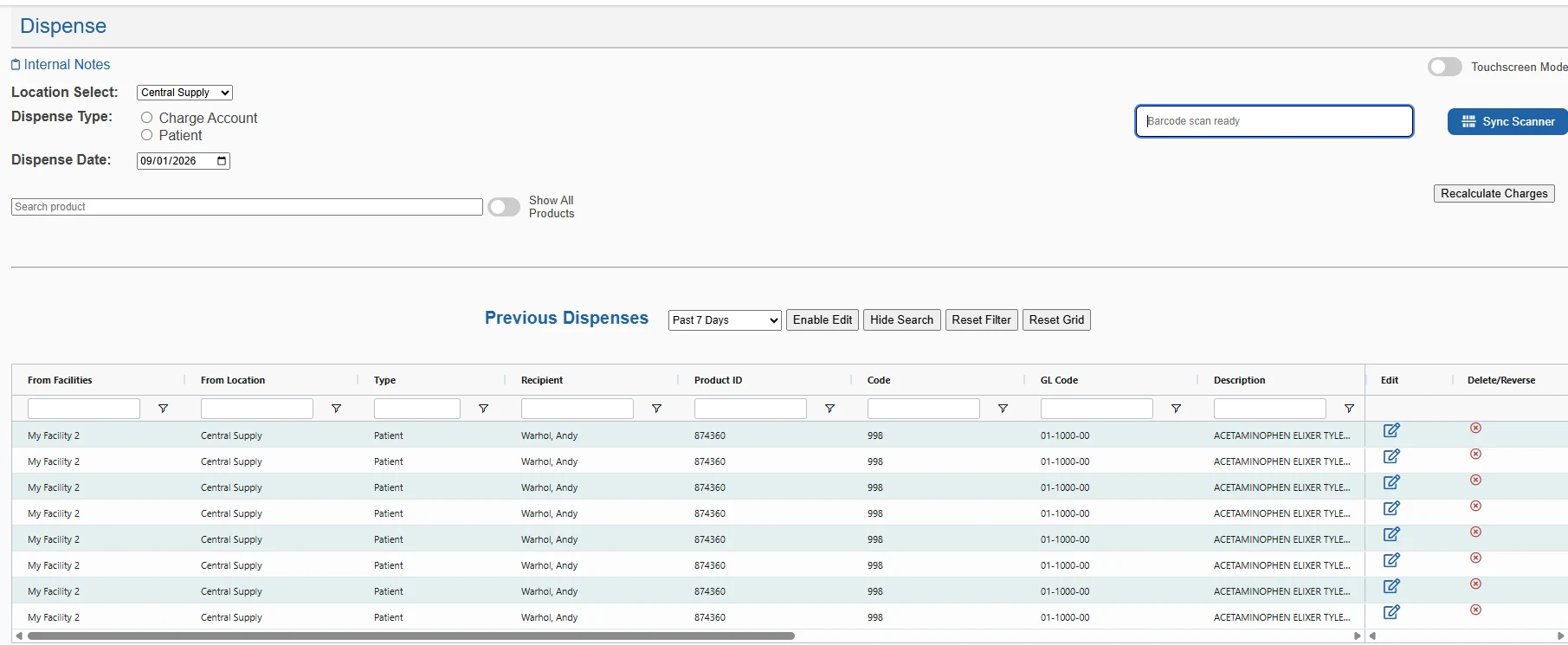
The Dispense screen tracks supplies and services used by individual residents.
Automated Recurring Charges
You can quickly set up recurring charges so that you no longer waste time on continuous, repeated entries.
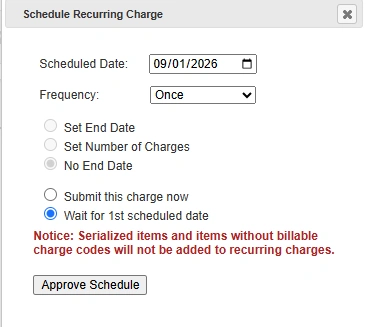
Options allow users to customize a variety of recurring charges.
SmartPO
And everything around the platform
Flexible Reporting
Flexible reports allow you to monitor purchases by vendor, item, or other criteria. Actionable data intelligence and tools accurately measure procurement performance. Reports can be exported to popular data formats like Excel.
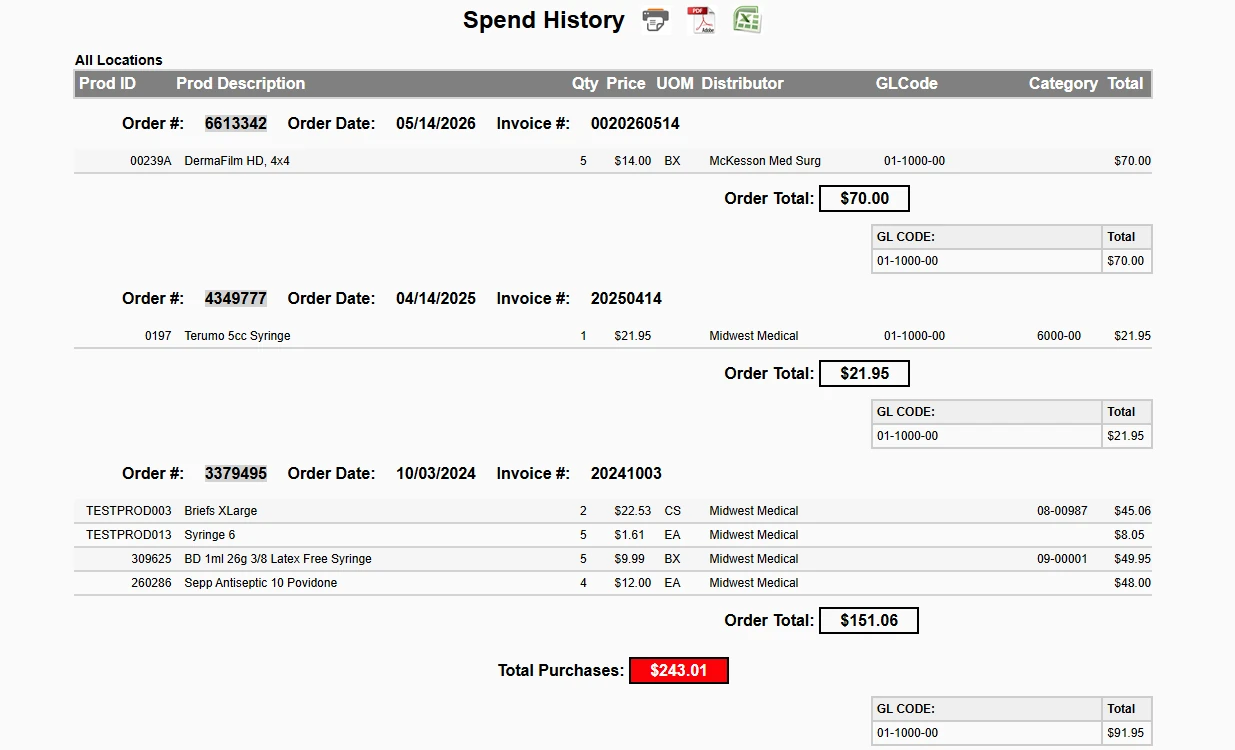
Reports can be exported to popular data formats like Acrobat and Excel.
On-the-Go Connectivity
SmartPO's fully-integrated mobile app lets you create and manage orders from anywhere.
Effortless Implementation
Our team fully implements SmartPO and trains your staff so they're quickly productive. We establish your vendors, load your approved products with correct pricing, and build custom templates. Afterwards, we are just a click or a phone call away should you have questions or new staff members in need of training.
Integrations
Works with the systems you already use




 QuickBooks

 Yardi
Yardi

Integrated Vendors
EDI and Punchout connections to the vendors you already buy from
EDI Vendors

























Punchout Vendors


































35+
Financial Integrations
75+
Electronic Vendor Integrations
EDI and Punchout
7,000+
Email Vendor Integrations
- One Procurement Platform, All Suppliers
- Contract Pricing on All Items
- Control Spend — Audit Each Order Line
- Invoice Routing and Approvals
- Designed for Large Practices and Groups